Tiny Apps lite (floating)4.0
Publisher Description
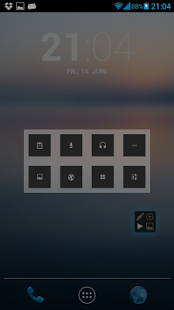
You can run several windows of the same Tiny App.
Tiny Notes
- save notes to your storage
- open saved notes
- share text right out of Tiny Notes
- copy and paste supported
Tiny Recorder*
- start a recording and save it to your storage
- delete and share recordings
Tiny Paint
- trace something on your screen
- open and save paintings
- select one of 36 colors
- undo possibility
- clear canvas
Tiny Musicplayer*
- lists all musicfiles on your device
- displays artist, title and albumcover
- play/pause, next, previous
- select random sequence
- enable repeatmode
Tiny Calculator
- calculate simple and complex arithmetical problems
- switch between basic and advanced numberpad
- copy the result to your clipboard
Tiny Apps includes a widget for your homescreen. You can open a Tiny App with less clicks.
Fell free to contact the developer: cadr.market@gmail.com
*This app doesn't support multiple instances.
About Tiny Apps lite (floating)
The company that develops Tiny Apps lite (floating) is Carsten Drösser. The latest version released by its developer is 4.0. This app was rated by 1 users of our site and has an average rating of 5.0.
To install Tiny Apps lite (floating) on your Android device, just click the green Continue To App button above to start the installation process. The app is listed on our website since 2013-11-13 and was downloaded 42 times. We have already checked if the download link is safe, however for your own protection we recommend that you scan the downloaded app with your antivirus. Your antivirus may detect the Tiny Apps lite (floating) as malware as malware if the download link to com.ragingtools.tinyappslite is broken.
How to install Tiny Apps lite (floating) on your Android device:
- Click on the Continue To App button on our website. This will redirect you to Google Play.
- Once the Tiny Apps lite (floating) is shown in the Google Play listing of your Android device, you can start its download and installation. Tap on the Install button located below the search bar and to the right of the app icon.
- A pop-up window with the permissions required by Tiny Apps lite (floating) will be shown. Click on Accept to continue the process.
- Tiny Apps lite (floating) will be downloaded onto your device, displaying a progress. Once the download completes, the installation will start and you'll get a notification after the installation is finished.
Program Details
System requirements
Download information
Pricing
Version History
version 4.0
posted on 2013-11-13
version 3.0
posted on 2013-06-19
Several fixes and updates
